While writing about a voice clone that runs in the browser, I became curious about what else a browser could do with a small model.
I had also built a music player in Swift as a hobby. I wanted to bring that experience to the browser, so I released an HTML DJ app called Remix. It lets you load your own tracks and play them on two turntables.
Analyzing tracks and blending them automatically
To connect tracks, Remix estimates their BPM, key, and changes in energy from audio onsets and frequency patterns. It uses those estimates to choose a track order and transition points.
Turn on Auto blend and the app plays the tracks in sequence. While listening to it as background music, I wanted a more detailed way to combine songs.
I then tried more detailed analysis, inspired by Apple's Music Understanding. Could I separate a track into parts in the browser?
Separating a song into four parts
I tried the open-source HTDemucs, Spleeter, Open-Unmix, and SCNet models for separating voice, drums, bass, and other instruments. After listening to the results, SCNet sounded best to me.
Try the result for yourself.
Listen to the parts
You can combine the four parts of the sample track, “Stay A Little.” On a computer, choose your own track to separate it in the browser and download each part. Your audio is not uploaded to a server.
A 12.9 MB model took five minutes
The SCNet model I used was only 12.9 MB. It looked small enough to be fast. In the browser, separating one track sometimes took more than five minutes, and the tab reached 1.9 GB of memory at one point.
A small model file still needs computation and memory to run. SCNet also produces all four parts together for each audio window. Writing the vocal output first would not make the complete vocal track finish sooner.
How does SCNet separate sound? Overview and model structure
The song becomes time-frequency data, passes through SCNet, and returns as four waveforms.
The encoder compresses features by frequency band. The separation network examines time and frequency. The decoder combines the result with encoder features and outputs all four parts together.
An LSTM reads a sequence while retaining information from its surroundings. A singing voice, for example, carries pitch and tone across time. The time-axis LSTM can use those neighboring frames to interpret the current one.
A single note also produces energy at several frequencies. A separate LSTM examines relationships between frequency positions. Both directions are processed within the current audio window.
Explore the actual model layers scnet.int8.onnx · 12.9 MB
The input and output shapes and the twelve LSTMs come from the execution graph used in this project.
Stereo real and imaginary components
Four stereo parts, real and imaginary components
ENCODER 14 → 32 ch2,049 → 616 bins
Split frequency bands and compress them at different rates. Convolutions extract features and pass a skip connection to the corresponding decoder.
DECODER 332 → 16 ch616 → 2,049 bins
Fuse the corresponding encoder features and upsample each frequency band.
ENCODER 232 → 64 ch616 → 186 bins
Split frequency bands and compress them at different rates. Convolutions extract features and pass a skip connection to the corresponding decoder.
DECODER 264 → 32 ch186 → 616 bins
Fuse the corresponding encoder features and upsample each frequency band.
ENCODER 364 → 128 ch186 → 57 bins
Split frequency bands and compress them at different rates. Convolutions extract features and pass a skip connection to the corresponding decoder.
DECODER 1128 → 64 ch57 → 186 bins
Fuse the corresponding encoder features and upsample each frequency band.
From encoder 3 ↓
BLOCK 1BiLSTM × 2hidden 128 → RFFT
One bidirectional LSTM processes the frequency axis and another processes the time axis. A Fourier transform changes the representation before the next block.
BLOCK 2BiLSTM × 2hidden 256 → IRFFT
One bidirectional LSTM processes the frequency axis and another processes the time axis. A Fourier transform changes the representation before the next block.
BLOCK 3BiLSTM × 2hidden 128 → RFFT
One bidirectional LSTM processes the frequency axis and another processes the time axis. A Fourier transform changes the representation before the next block.
BLOCK 4BiLSTM × 2hidden 256 → IRFFT
One bidirectional LSTM processes the frequency axis and another processes the time axis. A Fourier transform changes the representation before the next block.
BLOCK 5BiLSTM × 2hidden 128 → RFFT
One bidirectional LSTM processes the frequency axis and another processes the time axis. A Fourier transform changes the representation before the next block.
BLOCK 6BiLSTM × 2hidden 256 → IRFFT
One bidirectional LSTM processes the frequency axis and another processes the time axis. A Fourier transform changes the representation before the next block.
↑ To decoder 1
Shapes are batch × channels × frequency × frames. STFT and inverse STFT run before and after the ONNX model. Model · SCNet paper
Changing how the model runs
I kept the trained weights and rebuilt the browser execution path. It combines ONNX Runtime subgraphs with an LSTM kernel written for WebGPU. I also borrowed ideas from local LLM optimization, including buffer reuse and fewer synchronization points.
On Chrome on a Mac, I measured one inference using the same input. The initial WebGPU path took about 17.7 seconds; the revised GPU path took about 1.7 seconds. The improved number is a warm run, measured after the model had run once and the GPU was ready.
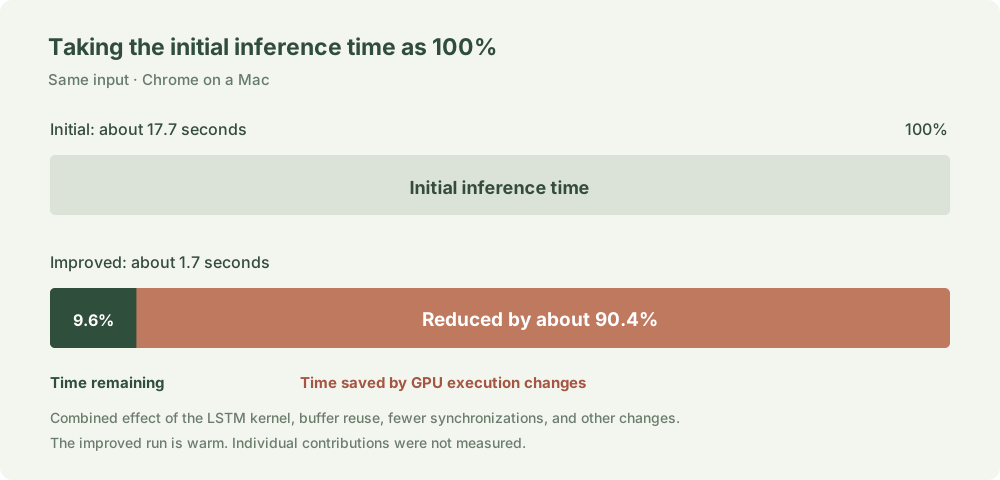
One inference now took about a tenth of its initial time. The reduction combines several changes, including the LSTM kernel and buffer reuse.
I also revised CPU processing. In a separate Node test with a simulated model, changes including buffer reuse reduced CPU processing time by about 13%.
After inference, the frequency data still needs to be reconstructed as audio. In a warm test with six seconds of audio, moving the inverse FFT and overlap-add to WebAssembly reduced that step from about 209 ms to 67 ms. Total processing time fell by about 105 ms, or 6%.
Streaming the result
Analysis was faster, but waiting for the whole song still made for a poor experience. I changed the player to let you listen to completed sections as they arrive.
Remix divides the song into overlapping windows and passes each one to SCNet. Once later calculations can no longer change a section, it sends roughly 5.5 seconds to the player. All four parts share a playhead, so you can switch between voice and drums in the middle of the song.
In an early test with a 60-second recording, the first section was ready to play after 5.5 seconds. The complete WAV took 40.7 seconds. I could listen to the beginning while the rest was still processing.
I also revisited memory use. During playback, Remix keeps nearby sections in memory and caches completed sections in the browser. In a separate six-second measurement, a change to buffer release reduced peak GPU allocations from about 1,317 MB to 733 MB. That measures GPU buffers, not the whole browser tab.
Combining parts from two songs
Separation changed how I could use the DJ app. I can combine the voice from A with the backing from B, or swap just the drums. Each of the four parts has its own waveform.
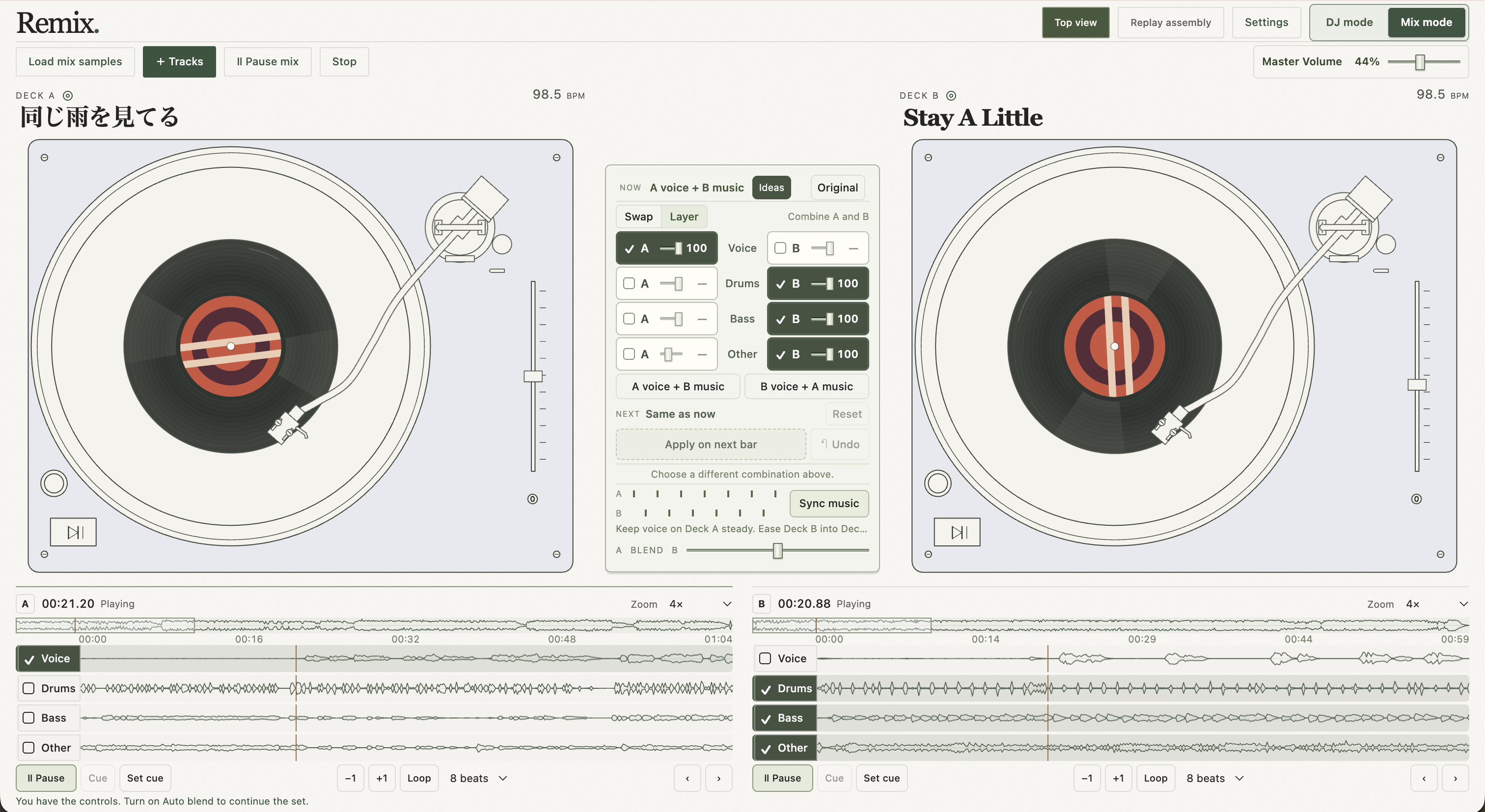
Auto blend connected whole songs in sequence. With separated audio, Remix can also suggest mashups that combine parts of two tracks.
Mix Ideas looks for compatible tracks using estimates such as BPM and key. Once separation has progressed for a pair, it also uses activity in the individual parts to suggest passages and combinations.
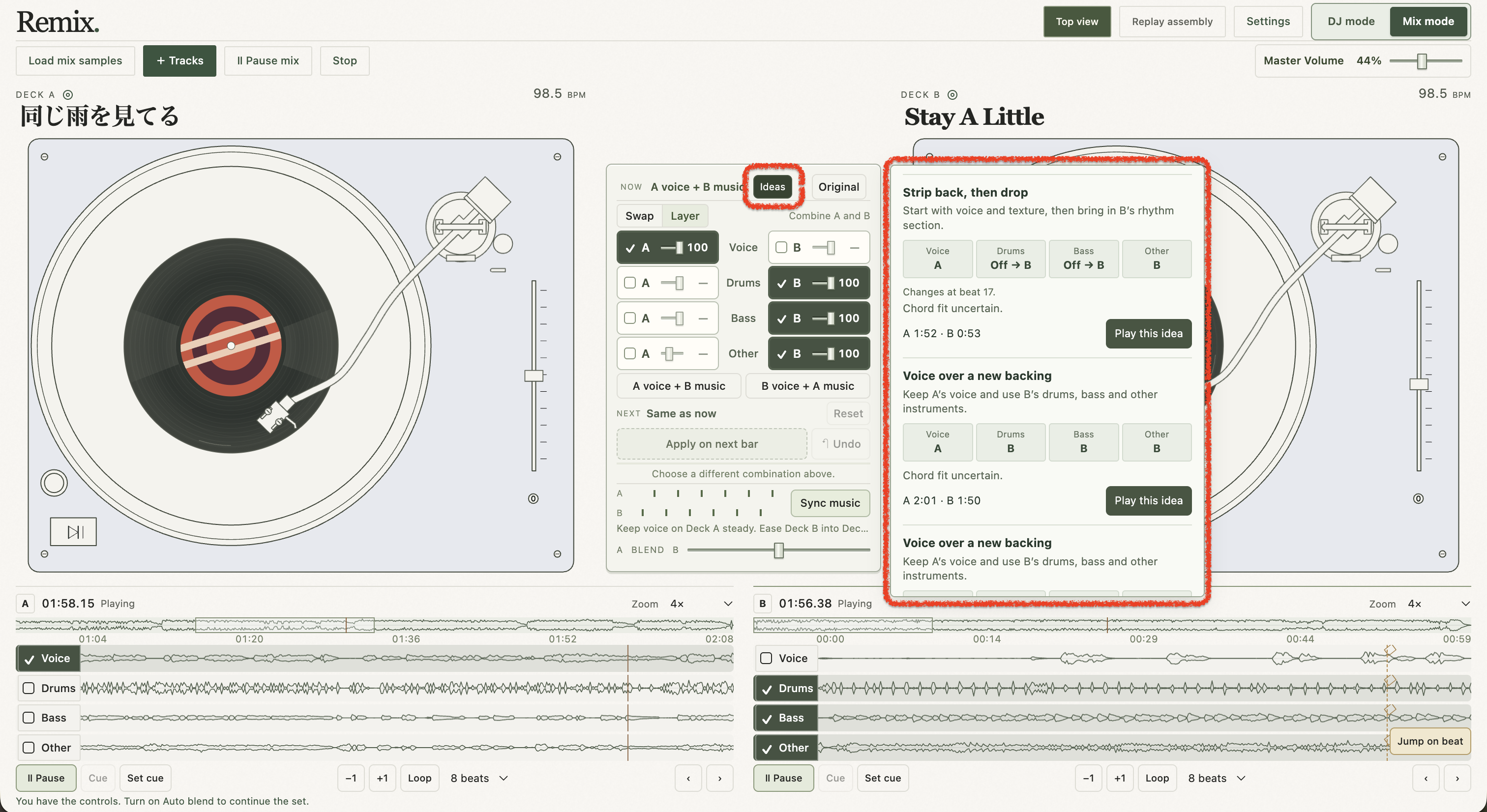
Samples for phones
Live separation crashed when I tried it on a phone. I prepared two sample tracks in advance and compressed their parts into sections that load as needed.
On a phone, you can try Mix mode with those samples. On a computer, you can also separate your own audio.
Try Remix with the samples or your own tracks. I think it could be fun for making your own mashups, learning an instrument part by ear, or practicing karaoke.